

Over the years, I’ve noticed that the biggest UX wins in Hotwire Native apps come from the smallest changes. Not fully native screens or even bridge components. Just small, intentional decisions that make your Rails views feel at home on iOS and Android.
In this deep dive, I’m sharing six improvements I apply to nearly every app I build. They’re quick, contained, and add up to a noticeably more native-feeling experience:
Handle file pickers natively with HTML
Keep users signed in between app launches
Present forms modally
Upgrade
<h1>tags to native titles (without breaking the cache)Respect dark mode with CSS
Adopt a mobile-first viewport
Paid subscribers also get access to the full source code for iOS, Android, and Rails.
1. Handle file pickers natively with HTML
One big advantage of Hotwire Native apps vs. mobile web is integrating with system data or APIs. Lucky for us, getting photos off of the device is as easy as writing HTML.
Add an <input> tag to your form that accepts images:
<%= form.file_field :image, accept: "image/jpg,image/jpeg,image/png" %>And… that’s it! This just works on iOS and Android. Users can select photos from their library, take a new photo, or even choose a file from the device.
Once a file is selected it populates the <input> field and goes along with the form submission, just like on the web. Active Storage Direct Uploads work, too.
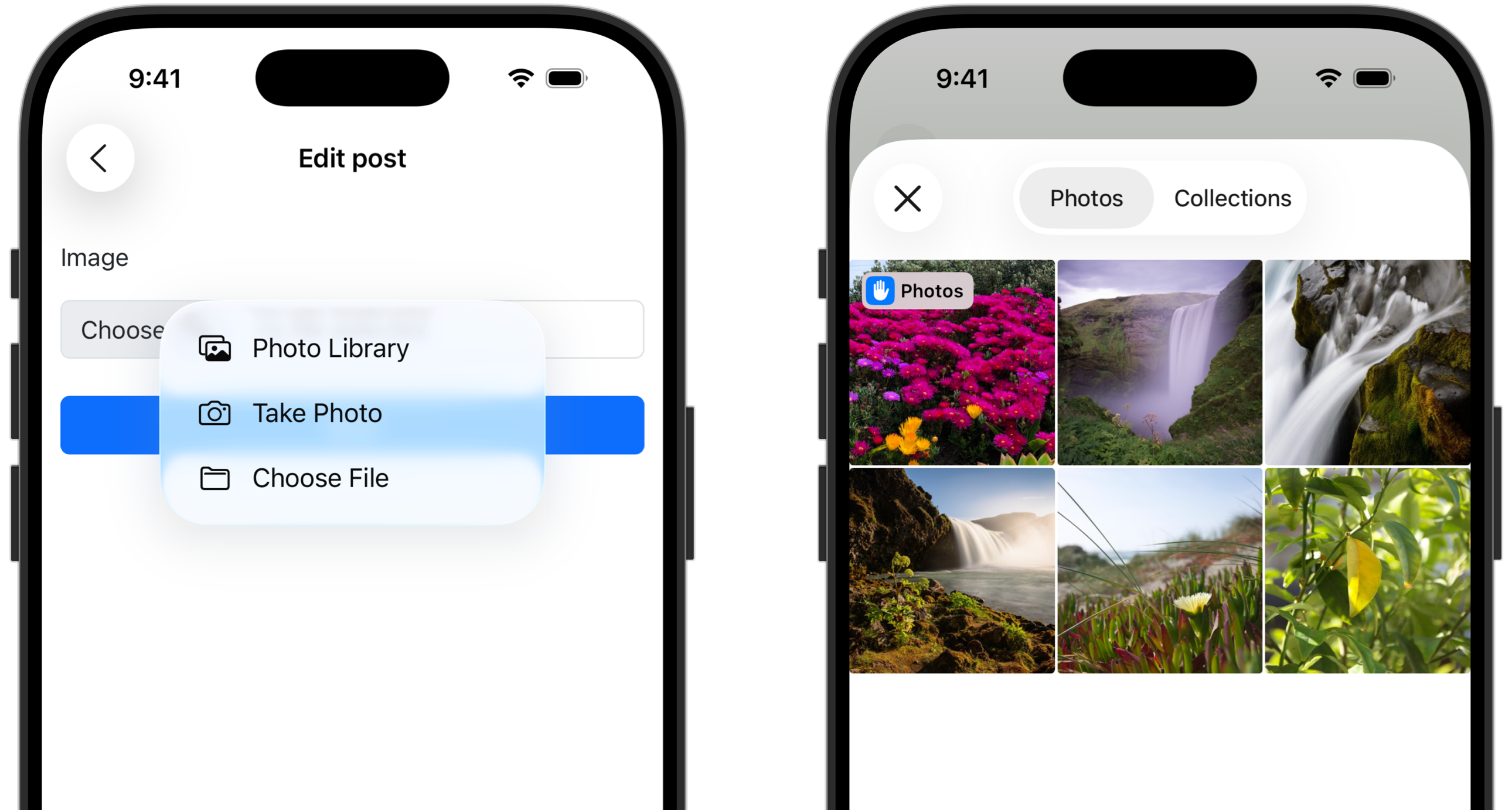
A heads up that you’ll also need to update your Info.plist file on iOS. Add NSCameraUsageDescription and NSMicrophoneUsageDescription to allow access to the photo library and enable microphone/video capture. The full source code, linked at the end, includes everything you need.
2. Keep users signed in between app launches
If you have to sign in every time you launch your app then this one’s for you. The key is setting a long-lived cookie that persists between launches.
Curious how to handle authentication in your Hotwire Native app? Here’s the exact approach I take with cookie-based authentication:

If you’re managing cookies directly then set a “permanent” one using cookies.permanent, which lasts for two years.
cookies.permanent.encrypted[:user_id] = user.idUnder the hood, Hotwire Native will automatically copy all cookies to disk after every successful page load. But it ignores session-only cookies. Desktop browsers, however, can sometimes keep these cookies alive, which is why you stay signed in on the web but not in your app.
Devise
You can do something similar in Devise by making sure “Remember me” is always checked on the sign in form for Hotwire Native apps:
<%= form_with url: session_path do |form| %>
  <% if hotwire_native_app? %>
    <%= form.hidden_field :remember_me, value: true %>
  <% else %>
    <%= form.check_box :remember_me %>
  <% end %>
<% end %>
3. Present forms modally
In native iOS and Android apps we can present screens as modals, having them slide up from the bottom instead of from the side. Modals provide focused, interruption-style experiences that are ideal for short, self-contained tasks.
We can take advantage of this UX pattern in Hotwire Native apps by presenting forms as modals, improving:
Task isolation: Helps focus attention on the specific task.
Validation errors: Easier to handle errors with standard Rails patterns.
Consistency: iOS and Android users expect certain UX when using apps
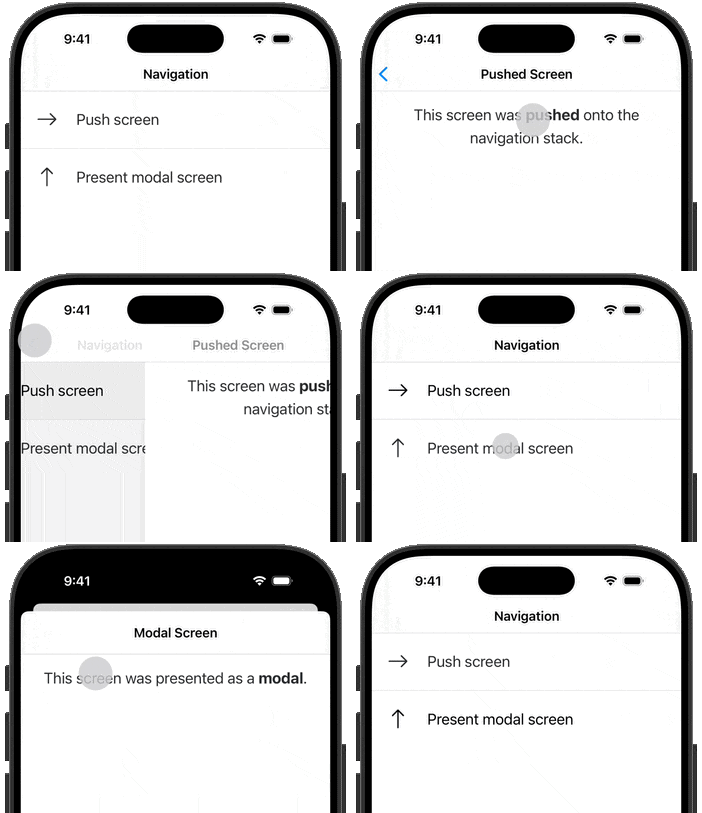
To present forms as modals we need to set up a path configuration rule. Path configuration is used to remotely change behavior on the app. Here, we’ll use it to tell which URLs should be presented as modals.
First, tell the apps where to find the configuration. On iOS, in AppDelegate right after the app launches:
Hotwire.loadPathConfiguration(from: [
    .server(rootURL.appending(path: "configuration/ios.json"))
])
And on Android in the Application subclass:
Hotwire.loadPathConfiguration(
    context = this,
    location = PathConfiguration.Location(
        remoteFileUrl = "$rootUrl/configuration/android.json"
    )
)
Back on the server, add a new route to config/routes.rb:
Rails.application.routes.draw do
 resource :configuration, only: :show
end
And finally, apply the actual configuration in the ConfigurationsController:
class ConfigurationsController < ApplicationController
  def show
    render json: {
      settings: {},
      rules: [
        {
          patterns: [
            "/new$",
            "/edit$"
          ],
          properties: {
            context: "modal"
          }
        }
      ]
    }
  end
end
Now, any visited URL ending in /new or /edit (the usual form-like endpoints) will route as a modal in the apps.
Check out the included source code at the end for a more robust solution with versioning and Android- vs. iOS-specific configuration.
4. Upgrade <h1> tags to native titles
Your web app is most likely rendering a <h1> tag on every screen. But native apps already have a built-in way for titles: in the navigation bar.

We’ll take advantage of the native title with some dynamic rendering and a conditional CSS file that only renders in Hotwire Native. And wrap it up with a way to dynamically inject a data-* attribute so it doesn’t affect the cache.
